ENZZO · PART 2 OF 3 · AUG 2024 TO NOV 2026
AI in the product
The chat, quick actions and guided video I designed for the AI in Enzzo, and two concept prototypes that did not ship.
Role
Product Designer: interaction design, UX writing, specs for engineers
Duration
Aug 2024 to Nov 2026
Team
CEO, CTO, product and four engineers.
At a glance
Problem
Enzzo AI answered in long blocks that packed several questions into one, so the one that mattered got lost, and a blank input was hard to start from.
Change
I pushed for short, direct answers and quick answer models, and designed quick actions capped at four suggestions, answer pills, queued messages and contextual AI in each tab.
Result
77% of products in production went from creation to chat to the Images tab, as of October 2026. That shows how people use the chat, not that the change caused it.
My part
The chat and quick actions, the specs for the quick actions and skills I designed for, guided video creation and two scoring concepts that did not ship.
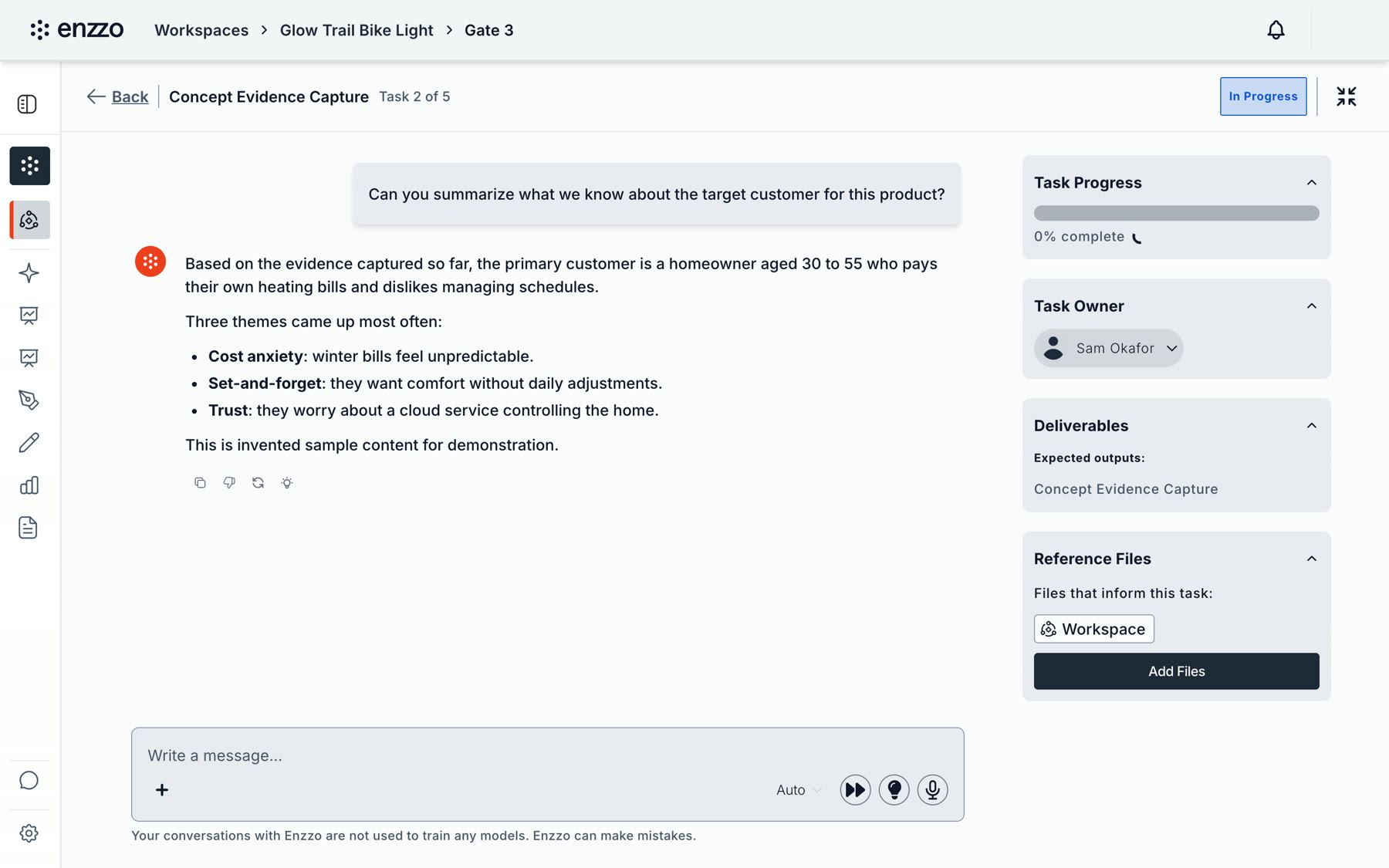
A task chat beside its progress, owner and deliverables.
At first, Enzzo AI wrote every artifact on its own and answered in long blocks that packed several questions into one, so the one that mattered got lost. Part 2 of my Enzzo case study is about making the chat shorter and easier to start: quick actions, the spec I wrote for cancelling a questionnaire, guided video creation, and two scoring ideas that never shipped.
Every screen and video here comes from a demo workspace with invented products, people and numbers, so none of it is client data.
Chat, quick actions and contextual AI
At first Enzzo AI wrote every artifact on its own. Its answers were long and packed several questions into one block of text, so the important question got lost. I worked with the teammate who wrote the prompts and the engineers who built it, and pushed for short, direct answers and for quick answer models, where the user picks from good alternatives and can change a document with AI. Once there is a full document, longer text is fine, because markdown styling makes the bold parts easy to see. In client meetings clients said it became a lot faster to finish tasks and to rework the parts that needed improvement.
A blank input is hard in a product this broad, so I designed a quick actions panel capped at four suggestions, answer pills, queued follow-up messages, contextual AI in each tab and selection pop-ups. Behind the interface are over 100 AI actions, and I wrote specs for the quick actions and skills I designed for. In production, people use mode switching, image generation, web search and persona generation.
The chat opens with suggested prompts. Quick actions lets you start from a card and answer short questions.
One of those specs covered cancelling a questionnaire. QA found a dead end: once someone cancelled, there were no quick actions and no next step, because the X had no defined behavior. I wrote the cancel and resume behavior before it was built and asked engineering whether a half-answered questionnaire could be resumed. The engineer built resume as a Continue option and told me what was not ready. In the spec comments an engineer flagged a gap in the cancel behavior, and three days later I changed it again to the way he explained. When QA hit an ambiguous reply, I answered from the spec instead of calling a meeting.
Cancelling a questionnaire no longer ends in a dead end. Continue brings the questions back with your answers kept.
Guided video creation
Making a video was confusing. I made the chat ask one question per message: the product image, landscape or portrait, and the kind of video. It then offers three one-line story options, turns the pick into a timed 12 second script and asks for confirmation before it generates anything.
Guided video creation: one question at a time, from the product image to the finished video.
Interactive prototype
Guided video chat
Watch it play on its own: the chat asks one question at a time, a timed script appears, and the video lands in the Videos tab. Or choose Try it yourself and answer the questions.
Scoring and concept work
Scoring. An overall score that drills into dimensions, with recommendations, inline flags, focused improvement chats and a portfolio comparison. The scoring overview is released. The two concepts below are not.
Scoring: an overall score that drills into dimensions.
I designed two concepts that did not ship, and rebuilt them as working prototypes with fictional products and numbers. They share one set of data. Fix a recommendation in scoring, re-run the score, and the same product moves to a new stage in the portfolio report.
Interactive concept
Score recommendations and focused chats
A score tells you where you stand. It does not say what to do next. I designed a single Recommendations list, ordered by priority, with one short chat per item. The chat explains what is missing or assumed and asks one question with tap-to-answer options, and each item can be completed, skipped or rejected. The same item appears as a flag next to the section it affects, so the counts always match.
- Skipped items are not suggested again in the same session, but stay in the list.
- Rejected items clear the flag, are hidden, and no longer count in the score. The dismissal is recorded.
- Fixing items does not change the score by itself. Re-running scoring explains what changed since last time.
Try it: open a recommendation, answer its chat, mark it done, then re-run the score.
Interactive concept
Early-stage portfolio report
Early scores read like grades, so people treated a suggested next step as a promised jump. I show the score as a range, such as "could land between 5 and 8", with what would push it higher and what would push it lower. Each next step is an experiment: it states the question it answers, the category it targets, and the other categories it could also move.
- Every step can run scrappy or thorough, with its own cost and time. The total ask updates as you switch.
- A scoped "Ask Enzzo" chat on each step answers three questions: why this step first, what is the scrappiest way to test it, and what could go wrong.
- Products sit in four growth stages, so a portfolio owner can see where to spend.
Try it: pick a product, switch a step between scrappy and thorough, and open Ask Enzzo on a step.
Results
77%
of products in production went from creation to chat to the Images tab, as of October 2026.
116
super users generated images, 492 times, after the chat change.
Usage numbers cover the whole product. I only claim the parts I changed.
The chat change was built mainly for one enterprise client, in answer to direct feedback from them. After it, 456 products were created and about two thirds of customers edited the competitive table, so they work on the result instead of stopping at the first answer. The 77% and the 116 show how people use the chat I designed. They do not show the change caused it.
What the weaker numbers taught me
- PRD generation is rare and requirement assignment is barely used. From then on I checked usage before polishing a workflow.
- The chat tutorial is not instrumented in production, so I could not measure it. That is the first thing I would add.